Last updated: October 16, 2026
Cloaking House helps advertisers and agencies protect campaigns with traffic
filtering,
bot/VPN detection, and rule-based routing — while complying with applicable platform policies
and laws.
This documentation covers quickstart, API, SDKs, dashboard setup, and best practices.
Compliance first: Use Cloaking House only for legitimate
security, analytics, and
quality-control purposes. Do not use our service to deceive platforms, commit fraud, or violate
any policy.
A) Client Setup — End-to-End
Step 1 — Sign up
Open the dashboard and create your account.
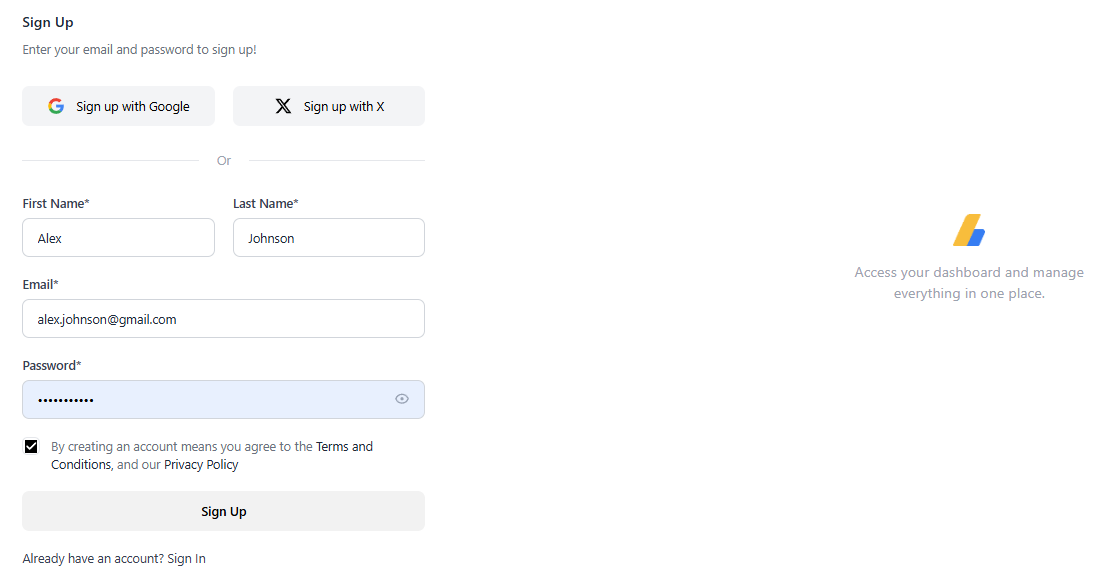
- Enter First/Last name and Email (or choose Sign up
with Google / X).
- Create a strong password. We recommend a password manager and enabling 2FA if available.
- Click Sign Up.
Use a work email so your team can be added to the same workspace
later.
Step 2 — Confirm your email
Check your inbox for our verification message and click the link to activate your account.
- If you don’t see it, check Spam / Promotions.
- Links expire for security; request a new one if needed.
Step 3 — Trial (7 days)
New accounts start with a 7-day trial that includes 1 Flow. This lets you build
and test a complete setup.
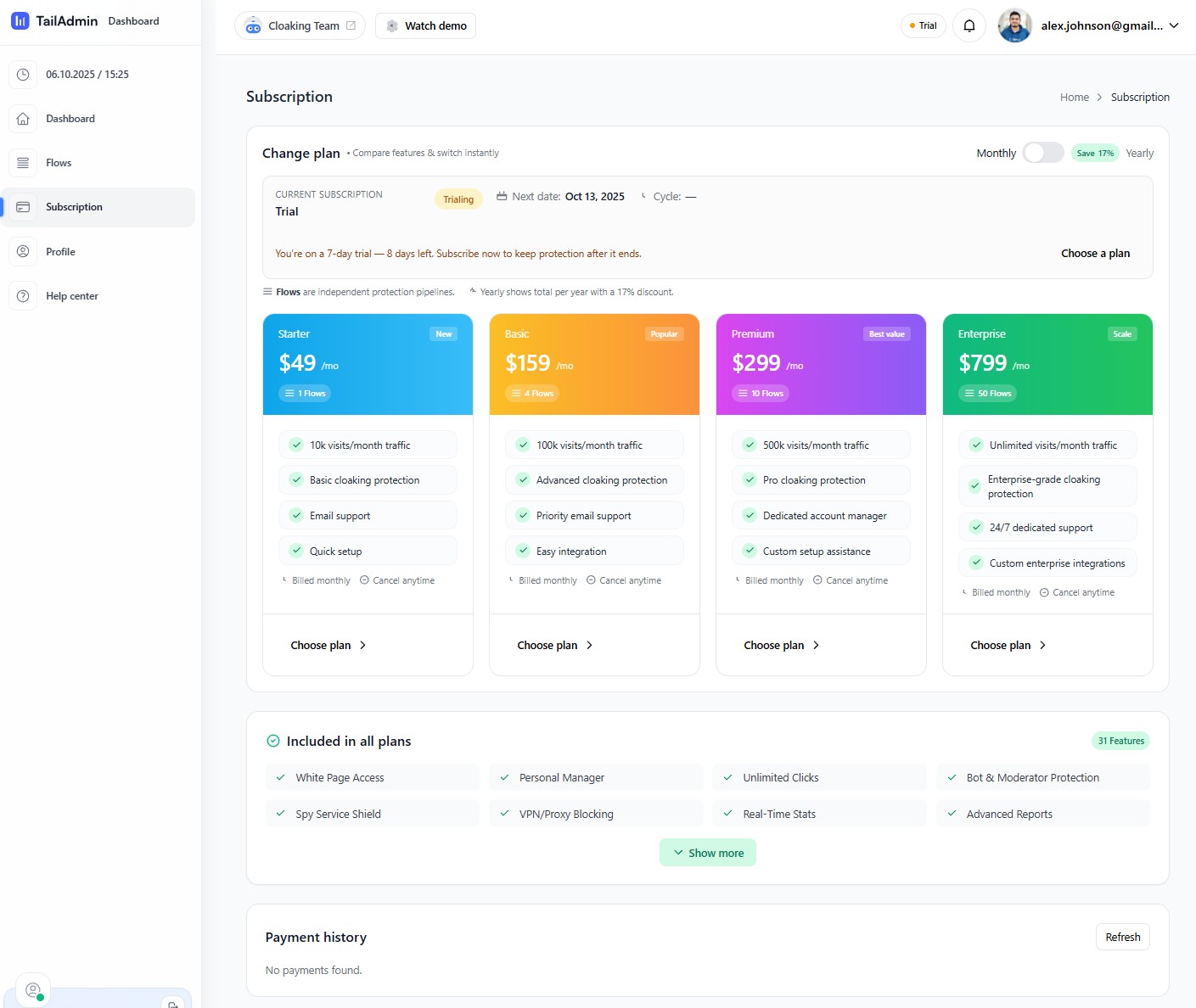
- Trial banner shows remaining days.
- When you reach your Flow limit (1/1), you can upgrade to add more.
Step 4 — Subscription & Payment
When you’re ready (or the trial ends), choose a plan and activate billing.
4.1 Choose a plan
Go to Subscription and compare plans. Starter includes 1 Flow / 10k visits/month.
4.2 Review & Subscribe
Confirm billing cycle and proceed to payment.
4.3 Payment
Send the exact amount to the address shown. We match automatically when the network
confirms.
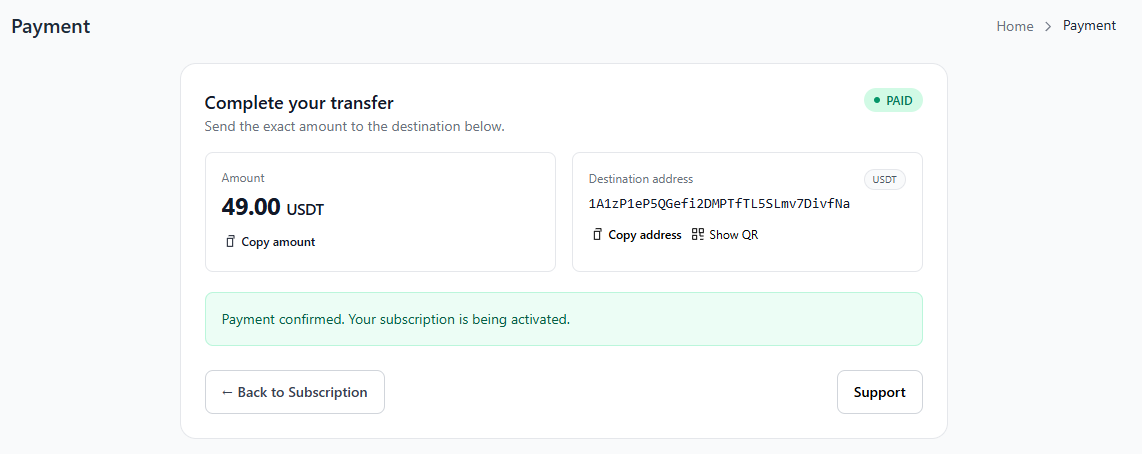
Once paid, your subscription activates automatically.
4.4 Payment history
Step 5 — Create your Flow
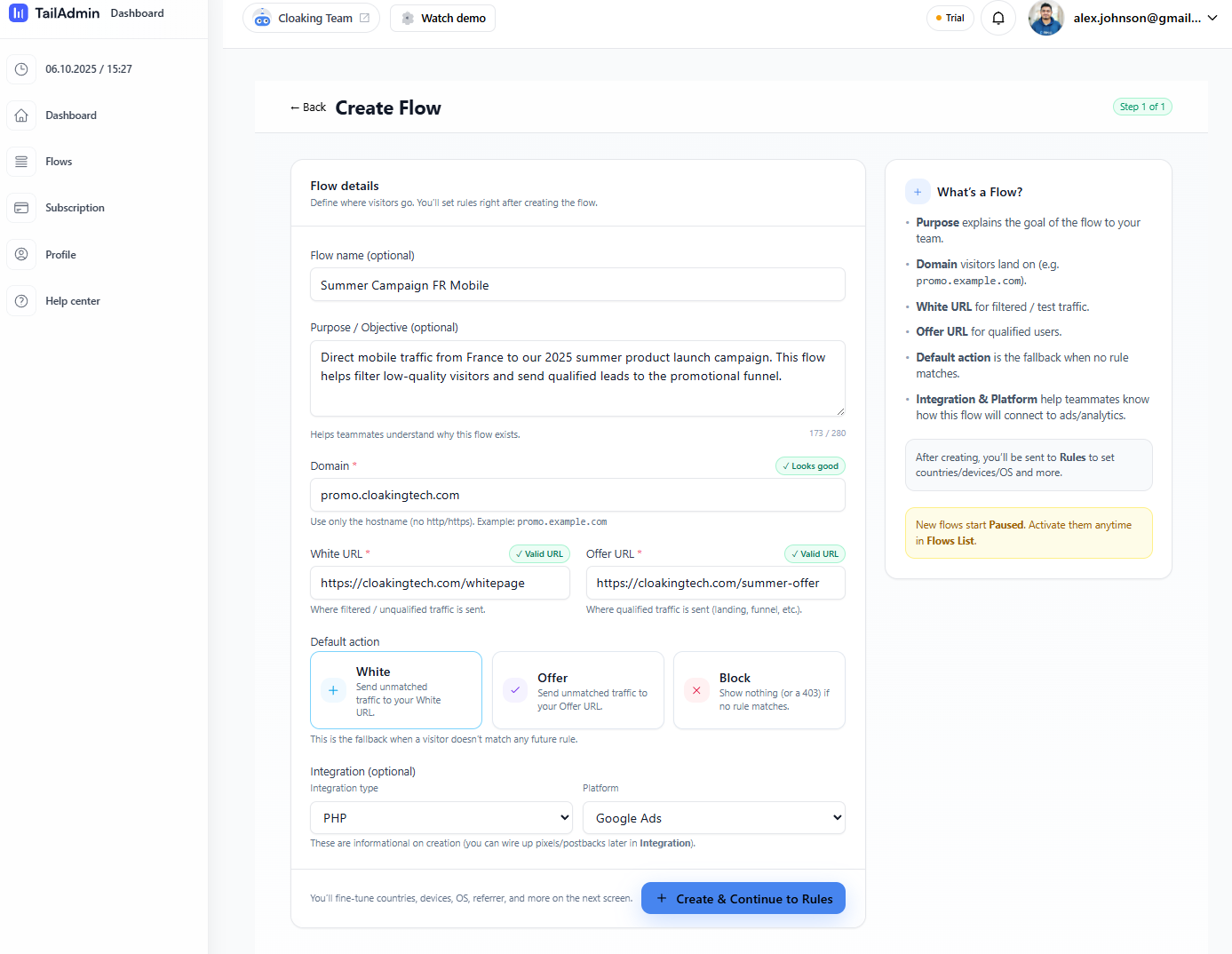
Go to Flows → New Flow and fill the form:
- Flow name & Purpose — internal labels for your team.
- Domain — hostname only (e.g.,
promo.example.com).
- White URL — where filtered/QA users go.
- Offer URL — where qualified visitors land.
- Default action — White is safest during testing.
- Integration — pick tech stack and platform (informational at creation).
Verify both URLs load and tracking pixels fire before moving on.
Step 6 — Add Rules (Targeting & Protection)
Rules decide who reaches the Offer vs who goes to the White page (or gets
blocked). Start conservative, then tighten.
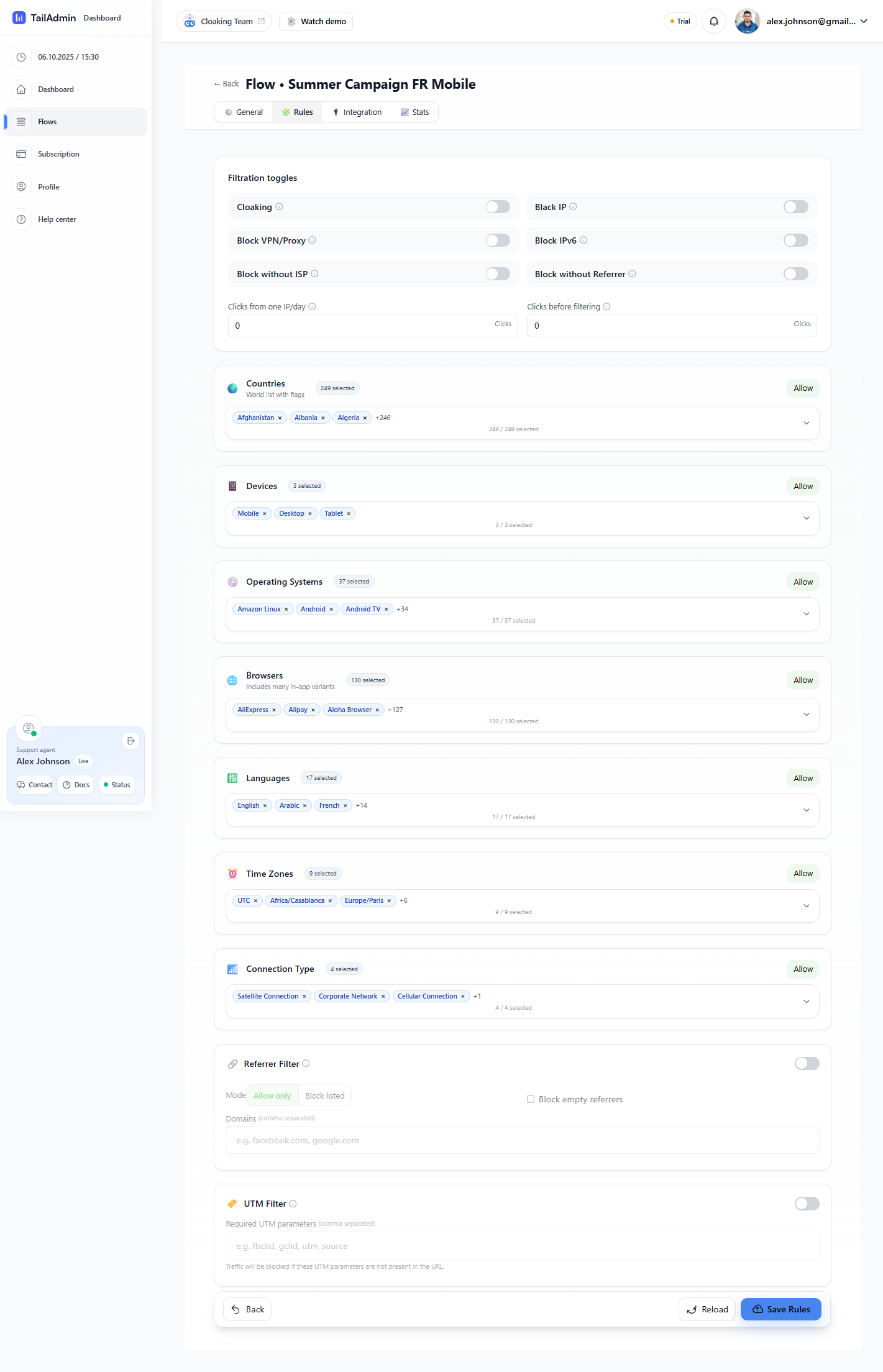
6.1 Filtration toggles
- Cloaking — master smart-filtering switch; suspicious traffic goes to White (or
blocked if you set Block elsewhere).
- Block IP — denylist single IPs or ranges.
- Block VPN/Proxy — filter known VPN/proxy IP space (reduces fraud; can affect some
legit users).
- Block IPv6 — rarely needed; use only if your stack lacks IPv6 support.
- Block without ISP — blocks requests where ISP/ASN is missing (catches some bots).
- Block without Referrer — blocks direct/blank referrers; useful when traffic
should only come from ads or partners.
- Clicks from one IP/day — rate limit repeated clicks per IP (e.g., 3).
- Clicks before filtering — grace clicks before strict filtering (handy during
warm-up).
6.2 Audience targeting
- Countries — allowlist only markets you target (e.g., FR for France-only).
- Devices — Mobile / Desktop / Tablet. For app installs, select Mobile and match
OS.
- Operating Systems — Android, iOS, Windows, etc.
- Browsers — Chrome, Safari, Firefox; optionally exclude fringe browsers seen in
abuse.
- Languages — browser language (e.g., fr-FR).
- Time Zones — useful for day-parting or regional promos (e.g., Europe/Paris).
- Connection Type — Cellular/Corporate/Satellite. Cellular narrows to mobile
networks only.
6.3 Advanced
- Referrer Filter — Allow only specific domains (safelist) or Block
listed. Option to Block empty referrers. Example allowlist:
google.com, facebook.com.
- UTM Filter — require parameters like
gclid, utm_source; missing
values send users to White/Block (per your default/other toggles).
If qualified visitors are being filtered, gradually loosen rules and
retest each layer (VPN/Proxy, Referrer/UTM, Geo/Device).
Click Save Rules when done.
Step 7 — Activate & Monitor
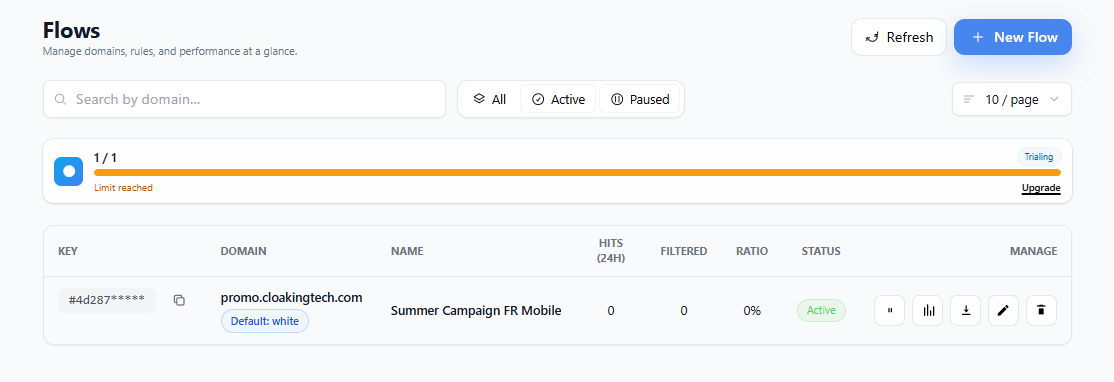
New flows start Paused. Toggle to Active, then watch Hits,
Filtered, and Ratio in the flows list.
- Stats icon → insights/logs; validate routing and suspicious patterns.
- Edit rules anytime; use Pause to test safely.
- Bar shows plan Flow limit (e.g., 1/1). Upgrade to add more flows.
Step 8 — Integration (API / SDK)
Protect pages by checking visitors before rendering your offer. Typical order:
- Server receives request to a protected route.
- Server calls
/api/v1/check-visitor with IP, UA, headers, and path.
- Act on the decision: allow (render offer), challenge (light gate), or
block/white.
<?php
// Laravel example (Server-side)
$resp = Http::withToken(env('CM_API_KEY'))
->post('https://api.example.com/api/v1/check-visitor', [
'ip' => request()->ip(),
'user_agent' => request()->userAgent(),
'headers' => [
'accept-language' => request()->header('accept-language'),
'x-forwarded-for' => request()->header('x-forwarded-for'),
],
'path' => request()->path(),
'referrer' => request()->headers->get('referer'),
]);
$data = $resp->json();
switch ($data['decision'] ?? 'allow') {
case 'allow':
// render offer
break;
case 'challenge':
// lightweight challenge page or fallback
break;
default:
// route to White URL
}
// Client hint (optional, never rely on client-only)
(function(){
window.cm = window.cm || {};
cm.hints = {
tz: Intl.DateTimeFormat().resolvedOptions().timeZone,
lang: navigator.language,
dpr: window.devicePixelRatio || 1
};
})();
Wire post-conversion POST /api/v1/events to improve quality
scoring and reporting.
QA & Troubleshooting
- No traffic recorded → DNS not pointed yet, caching delay, or Flow still Paused.
- Everyone goes to White → rules too strict; relax VPN/Proxy, Referrer/UTM, or
Geo/Device.
- High false positives → lower strictness; safelist known IPs/ASNs/referrers.
- Blank/403 → Default is Block with no matching rules; use White
until finalized.
🛡 AI Traffic Protection
BestCloaking
Smart Traffic Filtering
Protect your ads, detect bots automatically, and route visitors in real-time
using AI-powered flows.
⚡ 30-Second Setup
🤖 AI Engine
🔁 Auto Redirect
📊 Full Logs
⚠ Required Setup
White Page & Offer Page
BestCloaking works by showing different pages to different visitors.
You must create two separate pages.
🛡 White Page
- Clean & compliant
- Used in ads
- Contains cloaking code
https://yourdomain.com/white
💰 Offer Page
- Real offer / checkout
- No cloaking code
- Approved traffic only
https://yourdomain.com/checkout
Ad Click → White Page → AI Filters → Offer OR Stay
Quick Start
1️⃣ Create Flow
Set White Page & Offer Page
2️⃣ Configure Filters
AI analyzes every visitor
3️⃣ Go Live
Upload PHP or add JS
🐘 PHP One-Click Integration
Download a ready-to-use index.php.
Upload it and BestCloaking routes traffic automatically.
- No configuration required
- Runs before page load
- Maximum security
/public_html/flow1/index.php
Ad URL: https://yourdomain.com/flow1
❌ Do NOT use /index.php in ads
📜 JavaScript Integration
Paste the script inside the <head> of your White Page.
<script src="https://cdn.bestcloaking.com/cloak.js?flow=YOUR_FLOW_KEY"></script>
⚠ Use ONLY on White Pages
🧩 WordPress Integration
Use the BestCloaking WordPress plugin to run cloaking
before the theme loads.
No coding required.
- Works with all WordPress themes
- Compatible with caching plugins
- No theme or page builder edits
🔧 Installation
- Download the BestCloaking Plugin (ZIP)
- Go to WordPress Admin → Plugins → Add New
- Click Upload Plugin and upload the ZIP
- Activate the plugin
⚙ Configuration
- Open Settings → BestCloaking
- Paste your Flow Key
- Save settings
✅ Once activated, traffic is routed automatically
according to your Flow rules.
⚠ Do NOT install cloaking scripts inside themes or builders.
📊 Traffic Logs
- IP Address & Country
- OS, Browser & Device
- Bot / Proxy Detection
- Flow Decision
🛡 Flow Filters
- Bot & crawler detection
- VPN / Proxy blocking
- Geo & device targeting
✅ Always enable security filters
⚠ Critical Rules
- Always use White Page in ads
- Never cloak Offer Pages
- One flow = one white + one offer
- Always test before scaling